From a free website to a full-stack app.
Tell AI what to build. It ships a real site to your GitHub - free on GitHub Pages, or a full-stack app with sign-ins and data on your own DigitalOcean.
Free for 3 days. No credit card required to start.
Catalog Admin
DraftNo messages yet. Describe what you want to build and the agent will work in your repository.
You're watching a scripted demo
Every prompt, click, and deploy in this card is on a loop. Sign up with GitHub to build something real. The agent writes the code, ships it to your repo, and deploys to your DigitalOcean account.
Free for 3 days. No credit card required.
A scripted walkthrough of the product. Real builds can take longer, and the live experience continues to evolve.
Two ways to build.
Start with a website. Add a backend the day you need one.
Hosted free on GitHub Pages
Show styled pages, link between them, use your own domain. Perfect for landing pages, portfolios, brochure sites, documentation. Hosted free on your GitHub account.
No sign-ins, no database, no file uploads - pick the full app for those.
Hosted on your DigitalOcean
Real sign-ins, payments, file uploads, admin dashboard, scheduled work, background tasks. The AI wires it up as you ask. Hosted on a fully managed server in your own DigitalOcean account.
A real backend means a real bill - DigitalOcean charges you at wholesale prices.
More than a prompt-and-pray demo.
Here's the kind of thing the AI ships. Pick what's closest, then describe yours.
A portfolio, brochure, or launch page
Pages, styles, your own domain. No accounts, no database - free static hosting on GitHub Pages, ready in minutes.
A newsletter or scheduled reports
Daily emails, weekly digests, monthly summaries. Flip it on at project creation, write the template, and the server runs it forever.
A subscription business
A monthly fee, customer accounts, a billing portal. The AI wires up Stripe checkout and the login screen; you decide what subscribers get.
An online store or marketplace
Products, photos, checkout, order history. People sign in, buy, get receipts. Money lands in your Stripe account; orders show up in your admin dashboard.
A members' community
Sign-ups, profiles, posts, comments, direct messages. Add invite-only access, paid tiers, or role-based moderation as you go.
An internal tool for your team
A control panel that only your staff can sign into. Edit records, generate PDFs and Excel exports, run scheduled imports, see live charts.
Two accounts to start. Free or full-stack at launch.
GitHub and an AI key are all you need to start building. Launch free to GitHub Pages, or add DigitalOcean when you need a backend.
GitHub and an AI key.
Two accounts to start. Your code lives in GitHub, the AI you pick does the building. Add DigitalOcean later, only if your app needs a backend.
Build from any browser.
Open it on your laptop, your phone, or a tablet at the beach. Tell it what to build - 'a landing page for my photography studio' or 'an app where coaches sell sessions with Stripe' - and ask for changes anytime.
Free to launch, paid to scale.
Static sites publish free to GitHub Pages on your own GitHub. Full apps deploy to managed hosting in your own DigitalOcean. Either way you get a live preview from the first AI change, errors get caught and fixed, and the code stays yours.
When something breaks, the AI fixes itself.
The AI doesn't hand you a codebase and walk away. It watches every build, every deploy, and every crash, and corrects itself.
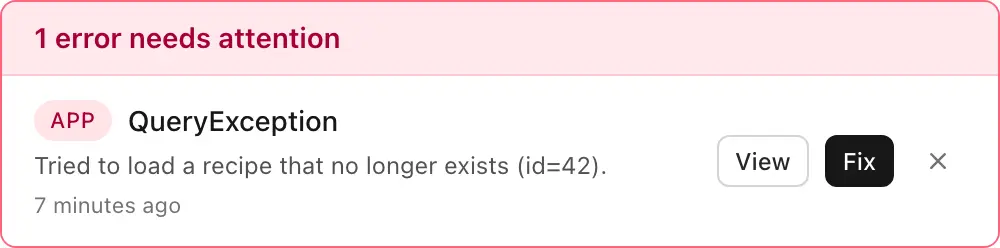
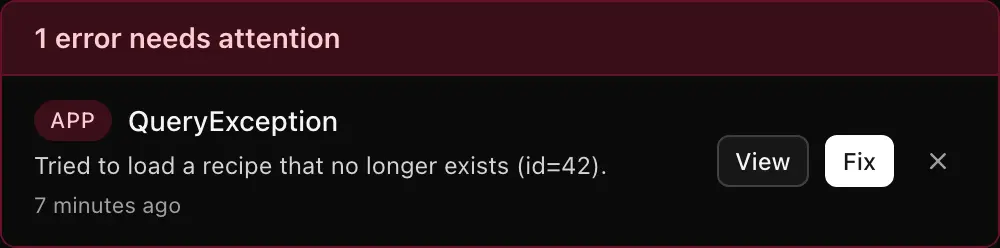
Errors fix themselves.
When the build fails, the deploy errors out, or the running app crashes, the AI sees the exact error, figures out the cause, and ships a fix. Usually before you noticed.
Spot a bug? One click sends it back.
When something looks wrong, press Fix and the AI gets the full picture: what you saw, what the logs say, what it just changed. No bug report to write.
Warned before problems land.
Every change is scanned for common security mistakes - leaked keys, unsafe inputs, bad permissions. You get a plain-English warning before the code goes live.
The builder you own, not rent.
Prompt-to-app tools get you to a demo. MakerLoft gets you to a real, portable product.
Based on publicly documented features as of spring 2026. Verify against each vendor's current docs.
Boring tech. Portable outcomes.
Every layer is what a senior engineer would pick for a real production app. Nothing gimmicky, nothing locked in.
Model-agnostic coding agents
Anthropic, OpenAI, Google Gemini, or any OpenAI-compatible endpoint. Bring your own API key; ride every upstream improvement.
Laravel 13
Migrations, auth, queues, Eloquent. A real codebase your team can read, fork, and extend.
Your GitHub
Every project lives as a repo in your account. MakerLoft commits changes each turn; you branch, fork, or walk away.
Shared sandbox previews
Every project gets a live preview URL the moment the AI ships its first change. We host it for you on a shared sandbox so you can play and share - no setup. Reset or pause it anytime.
GitHub Pages
Free static hosting for sites that don't need a backend. Pages, styles, links, custom domain. Lives on your GitHub account.
DigitalOcean App Platform
Fully managed. Auto-deploys on push, automatic HTTPS, no server to admin. Billed directly to your account at DO prices.
Managed MySQL
A real database per environment, with backups managed by DigitalOcean.
Pay per seat. Your keys, your bill.
We charge for the orchestration layer. Everything else flows to your own accounts at wholesale.
Solo or team
Cancel anytime. AI and hosting bills go straight to the providers.
- Unlimited projects · as many apps as your own hosting allows
- Any AI, any time · swap the builder mid-project
- Zero lock-in · your code, your GitHub, always
- Self-healing builds · the AI catches and fixes its own errors
- Free static hosting · static sites publish to GitHub Pages on your account, at no extra cost
- Live preview included · every project gets a hosted preview URL out of the box
Two accounts to start. One more if you need a backend.
Questions we get in beta.
I'm not a developer. Will I actually be able to use this?
Yes. That's the whole point. If you can describe what you want, we handle the rest. You chat; we write, test, and deploy the app to a real address on the internet.
What do I need to get started?
A GitHub account and an AI key. That's it. Every project gets a hosted live preview the moment the AI ships its first change, so you can build, share a link, and try things without ever signing up for hosting. To launch, static sites publish free to GitHub Pages on your GitHub account. Full apps need a DigitalOcean account, where the same code ships to your own managed server.
Can I build just a website, without a backend?
Yes. Pick GitHub Pages when you create the project and the AI builds a static site - pages, styles, links, your own domain - and publishes it free to your GitHub account. Pick DigitalOcean instead when you need sign-ins, payments, or saved data. You can have both kinds of projects in the same workspace.
Is there a free trial?
Yes. Every new account gets 3 days free with full access to the builder. We don't ask for a credit card to start - you only enter payment details if you want to keep going after the trial ends.
What does a project actually cost to run?
After the 3-day free trial, Solo is $10 a month, or $100 a year (two months free). Team is $20 per user per month, or $200 per user per year. Either way, plus your hosting bill if your app needs a backend (a basic DigitalOcean setup starts around $20 a month; static sites on GitHub Pages cost nothing extra) and whatever AI usage you rack up.
Can I take my code with me?
Always. Every project is a normal codebase in your GitHub. No export fees, no paywalled zips, no lock-in.
What happens when something breaks?
The AI watches every build, every deploy, and every crash. When it sees an error, it reads the actual error message, figures out the cause, and pushes a fix on its own. When you spot something, one click sends it back for another pass.
Do I need to install anything?
No. Everything runs in your browser. Nothing to download, nothing to set up. Build from your laptop, your phone, or a tablet wherever you are. If your laptop dies, sign in from another browser and your project is still there - the code lives in your GitHub, and once you've launched, the app runs in your own DigitalOcean.
Can I see my app before I set up hosting?
Yes. Every project gets a temporary live preview as soon as the AI starts building, hosted for you on a shared sandbox so you can play with the app and share a link without setting up DigitalOcean yet. The preview rebuilds after every change and stays up for a few days at a time. We send one text message to confirm a real person the first time you turn it on.
What does 'bring your own AI' actually mean?
You pick which AI builds your app. Swap mid-project, or use a different one per environment. You pay the AI provider directly, at their price.
Do I need to manage the server myself?
No. Your app runs on DigitalOcean App Platform - a managed environment that handles deploys, scaling, security updates, and HTTPS for you. You never log into a server, run setup commands, or babysit uptime. Push to GitHub and your app redeploys on its own.
Why my own hosting account instead of yours?
You pay wholesale (no markup), your data lives under your own billing and compliance, and if you ever leave MakerLoft the apps just keep running. The server is still fully managed - you own the account, but DigitalOcean does the admin work.
Can I edit the code by hand?
Absolutely. It's just a repository. Open it in your editor, push changes, and the app redeploys itself.
Want every option in detail? Read the guide.
Start building in two minutes.
Sign in with GitHub, drop in an AI key, tell it what to build. Launch free to GitHub Pages, or add DigitalOcean when your app needs a backend.
Free for 3 days. No credit card required to start.
By continuing, you agree to our Terms of Service and Privacy Policy.